Property Maintenance
Mobile work orders for property maintenance
Set up forms for repairs, unit turns, move-in and move-out inspections, and preventive maintenance. Record photos and signatures on site and share a PDF with the property manager.
Example work order workflow
Start the work order
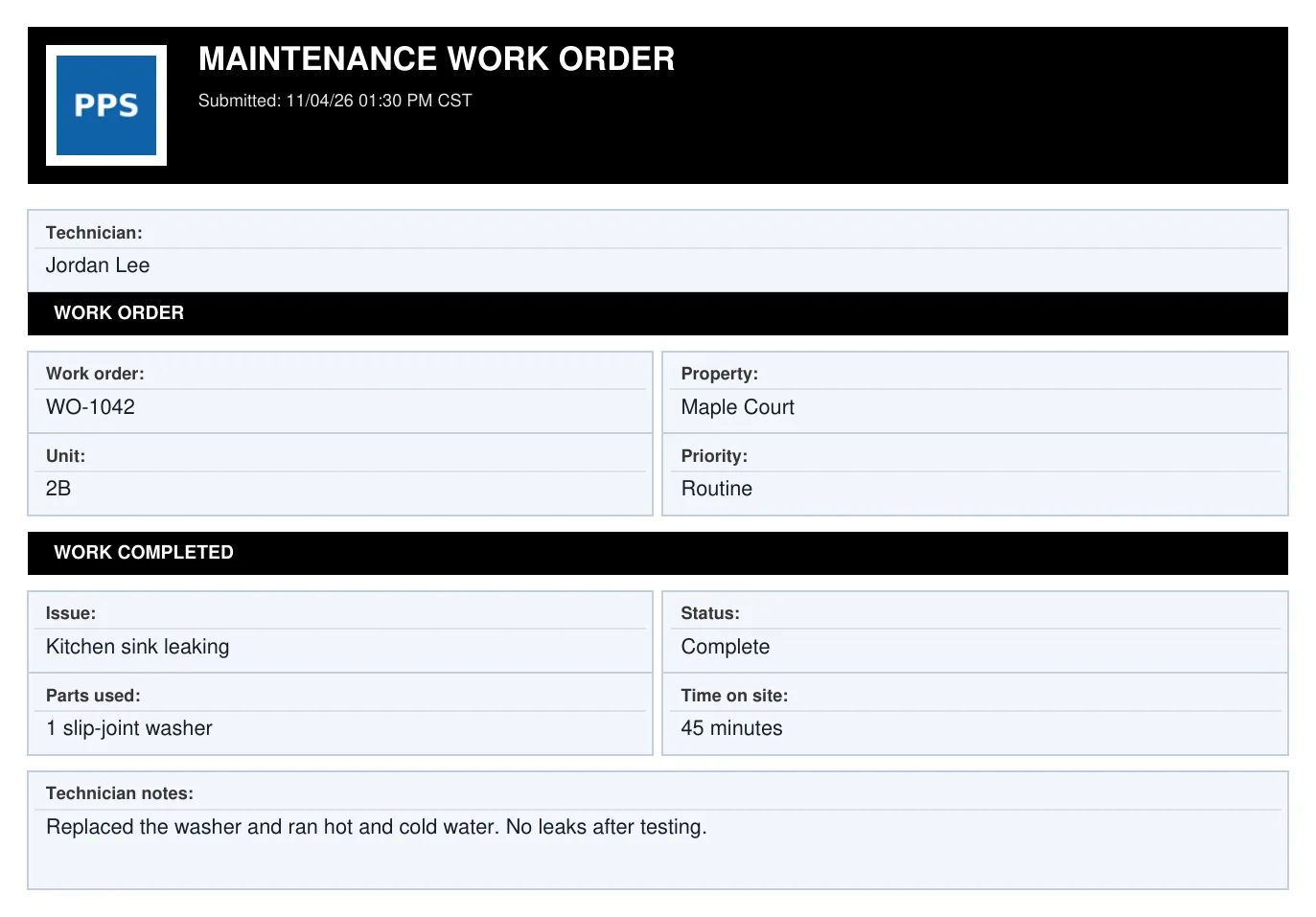
Select the property and unit and enter the work order number.
Record the work
Note the issue, parts used, and time on site. Add before and after photos if needed.
Get sign-off
Ask the resident or manager to sign on screen and complete any required fields.
Share the report
Download the PDF or set up email delivery to the property manager.
Fields and settings for maintenance forms
Rooms & units
Use a repeating entry for each room or unit you inspect.
Before and after photos
Attach photos to the repair or inspection item they show.
Conditional questions
Show follow-up questions only when something needs attention.
On-screen signatures
Residents and managers sign directly on the tech’s phone.
Offline forms
Fill in a downloaded form in a basement or mechanical room.
Property and unit lookups
Use a connected Google Sheet to look up properties, units, or parts.
Share a completed work order
A PDF can include the property, unit, work performed, photos, and signatures. If each unit has its own page in the inspection form, you can also export one PDF per unit.
- Email the PDF to the property manager automatically on submission
- Keep internal notes out of the customer copy
Can one form cover a whole building inspection or unit turn?
Yes. Use a repeating subform for rooms or units so techs add an entry for each one they inspect.
Can residents sign on the tech’s phone?
Yes. Signature fields capture an on-screen signature that appears in the PDF report.
Can property managers get a copy automatically?
Yes. Add their email addresses in the form’s delivery settings to send the PDF on submission.
Related features
Form Assistant
Attach a paper form, PDF, or photo and describe what you need. The Form Assistant proposes a mobile form you can preview and refine before applying it.
Offline Mobile App
Use downloaded forms offline on Android and iOS. The app saves drafts and sends queued submissions when the phone reconnects.
PDF Reports
Generate PDF reports from submitted forms. Include photos and signatures, and export a combined report or a separate PDF for each repeating entry.
Try a maintenance work order
Set up a repair or inspection form and fill it in on a phone.
30-day free trial · Cancel anytime · Admin seats free
Forms for property maintenance
- Vehicle inspection checklist
Check a fleet car, van, or pickup and record defects, photos, repair follow-up, and inspector sign-off.
- Work order template
Assign a maintenance job and record the repair, checks, labor, and sign-off.