Telematics Installation
Record telematics installs by vehicle
Use one form for the job and add an entry for each vehicle. Record the device serial, VIN, installation photos, and customer sign-off.

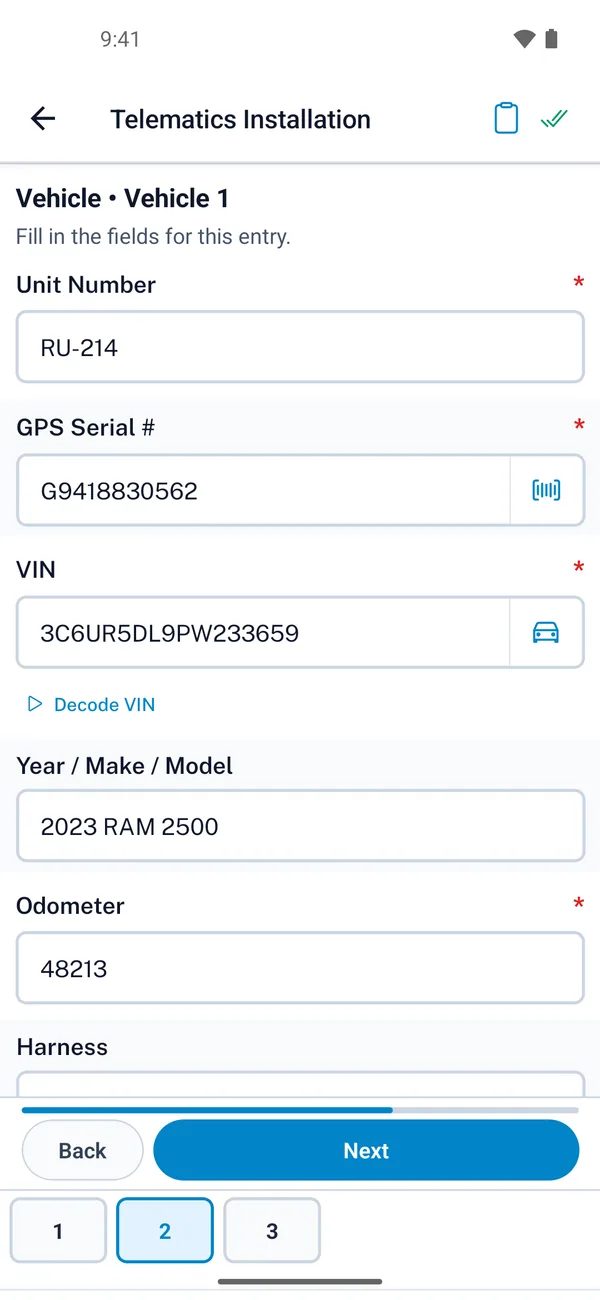
Example installation workflow
Open the job
Record the work order, type of work, and number of vehicles scheduled.
Add each vehicle
Record the unit number, device serial, VIN, odometer, harness, device location, and photos.
Get sign-off
Record how many vehicles were completed and any exceptions. Ask the customer to sign on the phone.
Export reports
Download a job report and separate PDFs for each vehicle.
Features for installation crews
GPS serials & VINs
Scan device serials or IMEIs. Decode a VIN when the phone is online.
One entry per vehicle
Use a repeating Vehicle subform in a single job form.
Install photos
Attach dash, harness, and instrument cluster photos to the vehicle entry.
Offline forms
Fill in a downloaded job form in a garage or depot and send it when the phone reconnects.
Per-vehicle PDFs
One report for your records and one PDF per vehicle for the fleet owner.
Vehicle lookups
Look up vehicle records from a connected Google Sheet.
One submission for the whole job
The office can open a job submission and review the vehicles recorded on it.
- Jump to any vehicle in the submission
- Created and last-edited times on every entry
- Clipboard mode for copying serials into a provider portal

How do we handle jobs with different numbers of vehicles?
Use a repeating Vehicle subform so technicians can add an entry for each vehicle on site.
Can we send fleet customers a report for each vehicle?
Yes. Set up vehicles as full-page repeating entries and export a PDF for each vehicle along with the combined report.
Can technicians copy serial numbers into an activation portal?
Yes. In Clipboard mode, copy a value such as the GPS serial or VIN and paste it into the activation portal.
Related features
VIN & Barcode Scanning
Scan or type a VIN to look up the vehicle’s year, make, and model. Scan barcodes and QR codes into text fields with scanning enabled.
Offline Mobile App
Use downloaded forms offline on Android and iOS. The app saves drafts and sends queued submissions when the phone reconnects.
Live View
See answers, photos, and repeating entries as in-progress forms sync. View when each entry was created and last edited.
Try a telematics installation form
Add a vehicle entry and check how it appears in the report.
30-day free trial · Cancel anytime · Admin seats free